# User Gating

## Fetching User Entitlements

To gatekeep specific features, you must fetch a user's entitlements using the User Access Token obtained during the [SSO Login](/dupr-raas/integration-checklist/sso-login.md) flow.

<table><thead><tr><th width="186">Environment</th><th>API</th></tr></thead><tbody><tr><td>UAT</td><td><a href="https://api.uat.dupr.gg/api-explorer?group=public#/Subscriptions%20Controller/getSubscriptions">UAT: Fetch User Entitlements</a></td></tr><tr><td>Production</td><td><a href="https://api.dupr.gg/api-explorer?group=public#/Subscriptions%20Controller/getSubscriptions">Prod: Fetch User Entitlements</a></td></tr></tbody></table>

{% hint style="success" %}
**Caching:** You may cache a user's entitlements for up to **24 hours** to avoid redundant API calls when a user performs multiple actions within a single day. After 24 hours, you must re-fetch the user's entitlements to ensure they reflect the most current subscription state.
{% endhint %}

Example Response Object:

```json
{ 
   "status": "", // Deprecated
   "displayName": "DUPR LLC",
   "entitlements": {
      "tournaments": [
      "BASIC_L1", "VERIFIED_L1", "PREMIUM_L1"
      ]
   }
}
```

***

## Understanding User Entitlements

Entitlements define what a user is eligible for within a specific resource.

<table><thead><tr><th width="321">Entitlement</th><th>Description</th></tr></thead><tbody><tr><td><code>BASIC_L1</code></td><td><strong>Mandatory Requirement:</strong> Indicates this user is eligible for the basic tier of a resource. Its absence indicates the user is restricted or banned.</td></tr><tr><td><code>PREMIUM_L1</code></td><td>Indicates eligibility for the premium tier (e.g. DUPR+ restricted tournaments).</td></tr><tr><td><code>VERIFIED_L1</code></td><td>Indicates the user is eligible for resources requiring identity verification.</td></tr></tbody></table>

***

## Platform Requirements

To maintain a full integration status, your platform must support the following gating logic:

1. **The Baseline Requirement**

{% hint style="danger" %}
A user must have the `BASIC_L1` entitlement to perform any actions on the platform. If this entitlement is missing from the response, the user should be treated as restricted or unauthorized for play.
{% endhint %}

2. **Premium Event Support**\
   \
   It is a requirement for partner platforms to provide the option for Premium Events.\
   \
   **Logic:** When creating or managing events, your system must check for the `PREMIUM_L1` entitlement.\
   \
   **Restriction:** If designated as a Premium event (e.g., DUPR+ only), users without the `PREMIUM_L1` tag must be prevented from registering or participating.

***

## Understanding Resources

Resources are the categories of play or features that entitlements apply to.

<table><thead><tr><th width="321">Resource</th><th>Description</th></tr></thead><tbody><tr><td><code>tournaments</code></td><td>Organized, rated events. Covers leagues and tournaments, but not necessarily other events, such as open play</td></tr></tbody></table>

{% hint style="info" %}
Please note, `tournaments` is the only resource currently in use.
{% endhint %}

***

## Testing Premium & Verified Users in UAT

To test `PREMIUM_L1` and `VERIFIED_L1` entitlements in UAT, you must complete the DUPR+ signup flow using a Stripe test card.

#### Steps

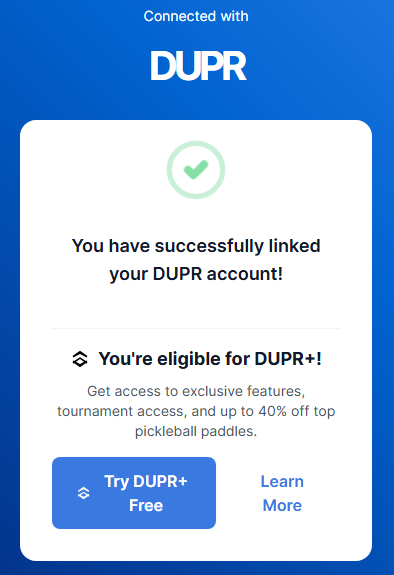
1. Complete the [SSO Login](/dupr-raas/integration-checklist/sso-login.md) flow in UAT. After linking their account, eligible users will see the following screen:

<figure><img src="/files/IF3mHilzVLdrfta8i9mj" alt=""><figcaption></figcaption></figure>

2. Click **Try DUPR+ Free** and complete the DUPR+ signup process.
3. When prompted for payment, use a [Stripe test card](https://docs.stripe.com/testing#cards) to complete the transaction.
4. Once the signup is complete, the user's entitlements will include `PREMIUM_L1` and `VERIFIED_L1`.


---

# Agent Instructions: Querying This Documentation

If you need additional information that is not directly available in this page, you can query the documentation dynamically by asking a question.

Perform an HTTP GET request on the current page URL with the `ask` query parameter:

```
GET https://dupr.gitbook.io/dupr-raas/integration-checklist/user-gating.md?ask=<question>
```

The question should be specific, self-contained, and written in natural language.
The response will contain a direct answer to the question and relevant excerpts and sources from the documentation.

Use this mechanism when the answer is not explicitly present in the current page, you need clarification or additional context, or you want to retrieve related documentation sections.
